Print Management Software for Business/Education
Print Job Manager
- Simple and easy to use.
- Tracks office printing and home printing.
- Designed for businesses and educational institutions of all sizes
- Manage, control, monitor, track, count, audit, quota, restrict, log, report user printing (Windows/Linux/Unix/Mac).
- Supports any printing environment (Windows print server, direct IP printer, and local USB printer).
- Supports any brand of printer and plotter (HP, Brother, Canon, Epson, OKI, Ricoh, Konica, Xerox, etc.).
- Secure Pull Printing / Follow-Me Print / Print Anywhere.
- Archives printed document as PDF format, easy to search, view, and reprint.
- Supports both Domain and Workgroup environments.
- Alerts about toner low, out of paper, printer error, etc.
- Client billing by job code, client code or project code.
- Supports Windows Active Directory integration.
- Supports MS Access and SQL server (including the free version of SQL server).
- Easy users / groups / print quotas / rules management.
- 100 reports designed for your print cost analysis and client billing in any language.
- Send automatic reports by email, including logs of printing activity and analyzed reports of costs.
- Reduces wasted printing by 20% - 50%.
Print Job Manager can can monitor all printing activity, handle charge-backs, control who is printing, how much is being printed and identify the cost of printing across your entire organization. Print Job Manager provides a straightforward software solution for Windows print servers and non-print server printing environment, i.e., direct IP printing or workstation connected printer. This software provides centralized print management capabilities for businesses and educational institutions through advanced print control, print monitor, print counter, print quota, and print audit capabilities. This software can be used with any brand or type of printer making it a global usage software; it also helps to track and control print jobs sent from Windows/Linux/Unix/Mac OS clients and eliminate unnecessary paper wastage. Billing reports generated can be sent in your desired language by email. This print manager software helps to track - jobs in the queue, deleted jobs and already printed jobs, which effectively monitors all printer activity.
Print Job Manager is the choice for the majority of our customers for day-to-day print management and control. Try before you buy with our 30-day free trial that lets you test drive our easy-to-use software to discover how it’s going to fit with your business. Businesses and educational facilities are using this innovative print control solution to manage printers, count printing, reduce printing costs and increased efficiency.
Track
1. Centralized Print manager & Print Monitor
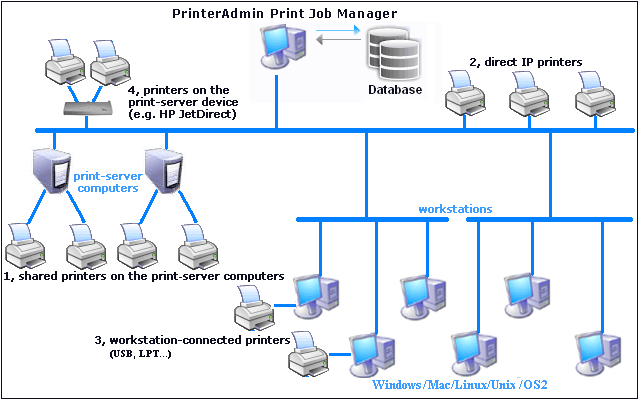
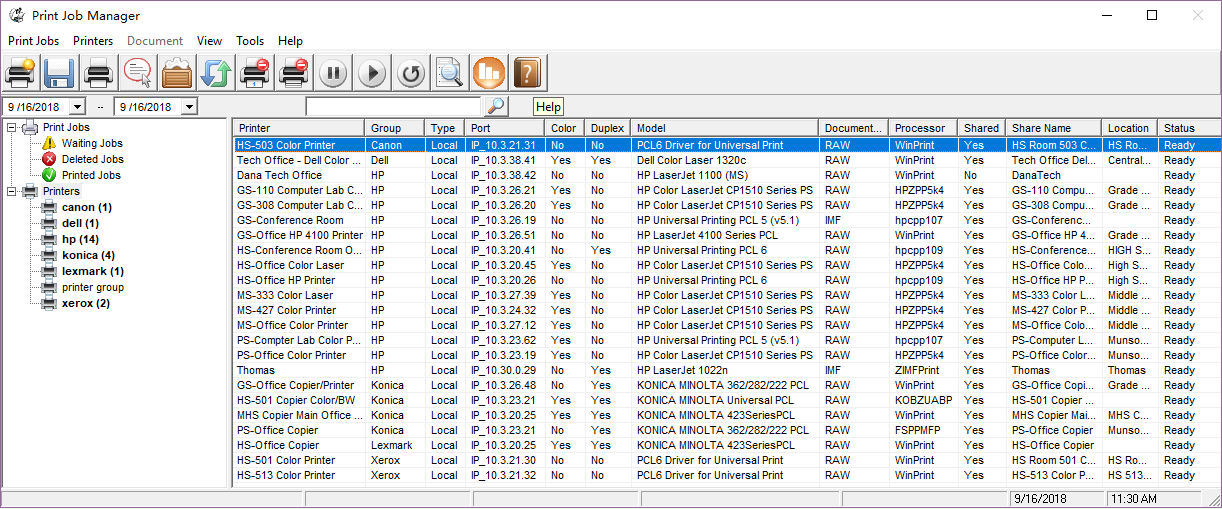
Print Job Manager manages and monitors all your print jobs from a single location. It can view, pause, resume, restart, or cancel multiple print jobs on different printers at one time. It can also delete all unclaimed print jobs automatically based on a user-defined time or user-defined policies. The administrator can view all print jobs, add/remove a user or update user account information (print quota, PIN, group, user status) through Windows or a web browser. The users can view and export their printing history, check the amount of money in their printing accounts or change their pin through a web browser. The software can count, quota, log, control and charge print jobs for all brands of printers and all types of printing with or without a Windows print server.
- The printers on Windows print server and shared (Users send the jobs to the shared printer on the print server)
- The printers connected to the network directly via the IP address (Users send the jobs to the printer directly via the IP address of the printer)
- The printers connected to the office computers and home computers through USB or LPT cables
- The printers connected to the print-server device (e.g., HP JetDirect)
2. Real Time Print Counting & Print Tracking
Print Job Manager captures the detail print job information including name of the user who sent the job, the document name, number of pages, total cost, submission time and date, destination printer, name of the computer from which the job was sent, duplex, color, paper size and print job size.
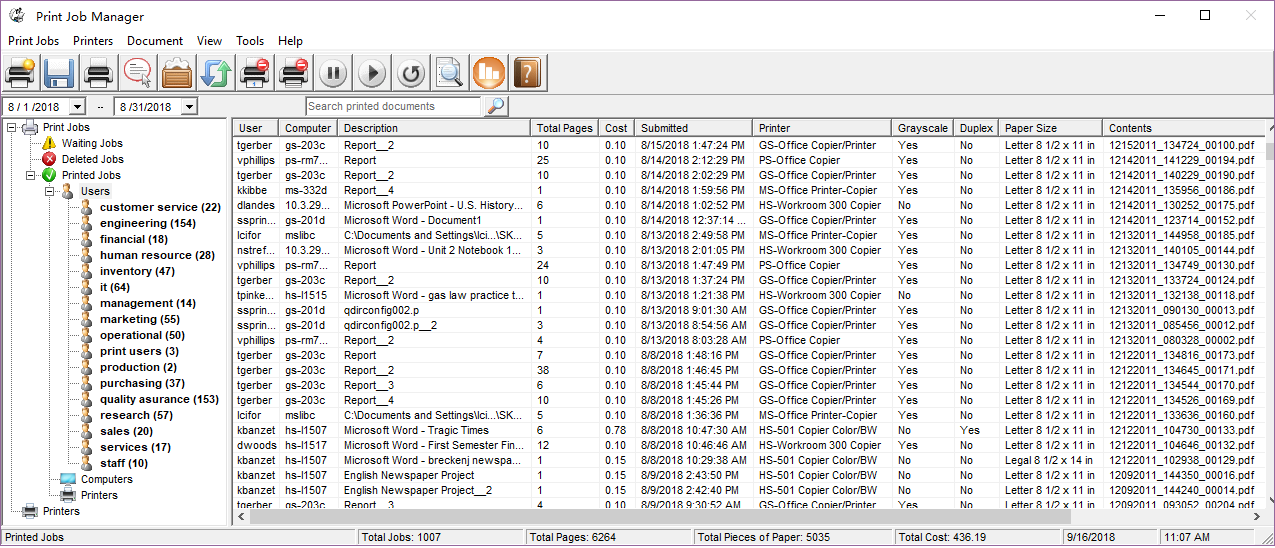
Retrieve Printer Information (Print Counter, Toner Level...) Print Job Manager can scan network printers and collect printer inventory information including print counter, ink / toner usage, serial number, printer model, printer IP address, MAC address. It may also allow you to reset print counter and serial number remotely.
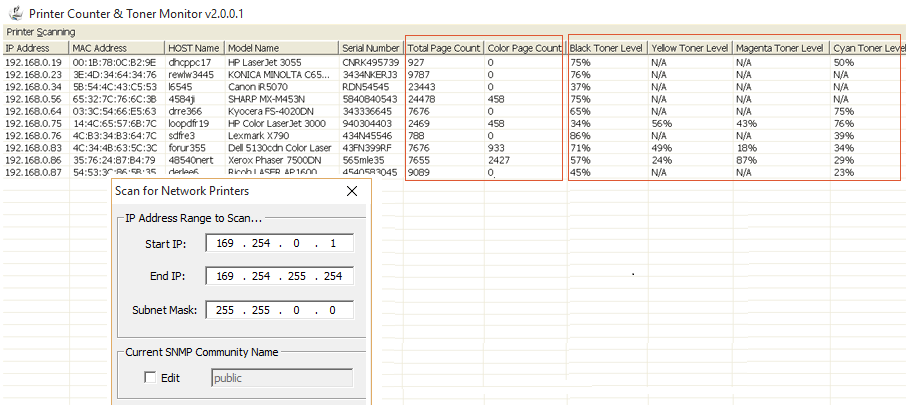
3. Automated Reporting
Print Job Manager provides a reporting tool allowing you to generate 100 reports that can be exported to PDF, Word, Excel and rich text formats. The reports can be created in any language and sent by email automatically. The reports can also be viewed from the web browser. The reports are designed for your print cost analysis and client billing.
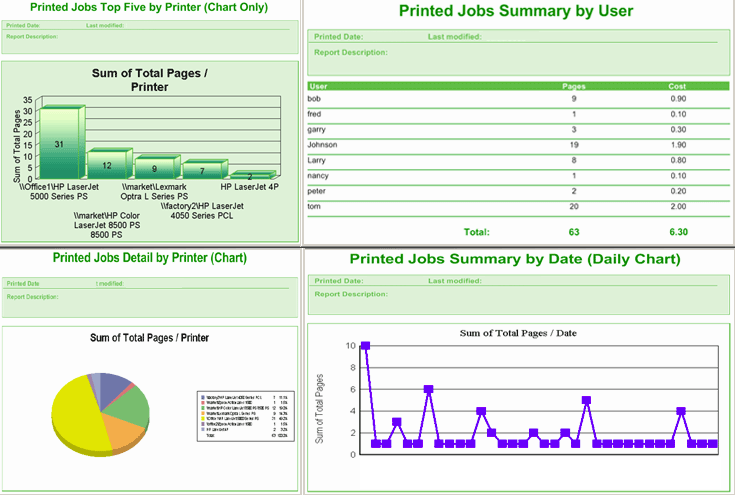
4. Backup and View the Content of Print Jobs
Print Job Manager allows the administrator to view the content of waiting jobs/deleted jobs/printed jobs on the print server and archive the copy of the print jobs.
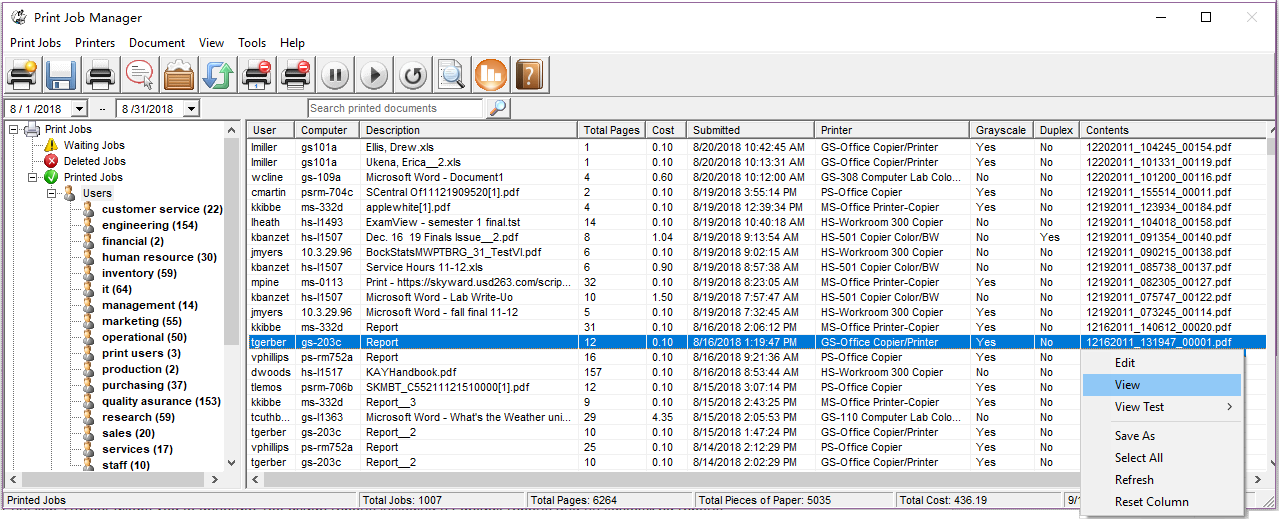
5. Print Accounting
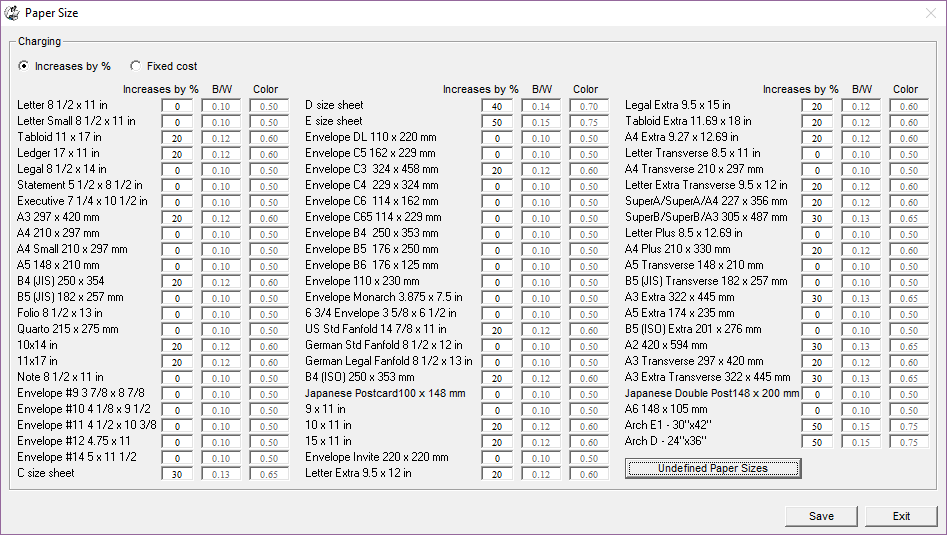
Print Job Manager charges print jobs based on pages, monochrome/color, duplex, paper size (68 standard paper sizes & 40 self-definable paper sizes).
6. Optional Web Interface
The software allows administrator to view all print jobs, update user (print quota, PIN, group, user status) through a web browser. It also allows users to view and export their printing history, check print quota or change PIN through a browser.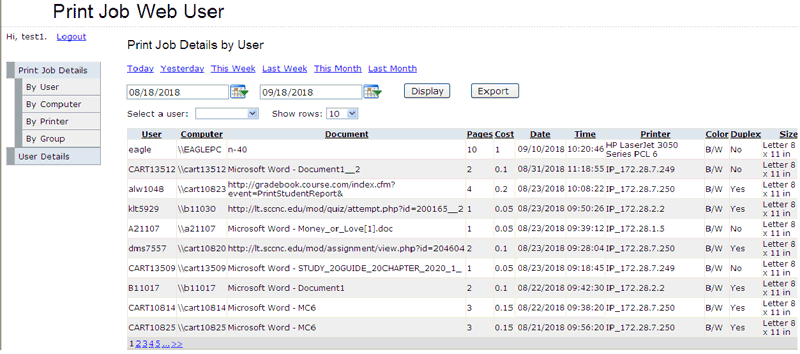
7. Printer Monitoring
Print Job Manager monitors all your printers and print servers from a single location, and sends an alert message about printer toner low, out of paper, and print error by email.
Control
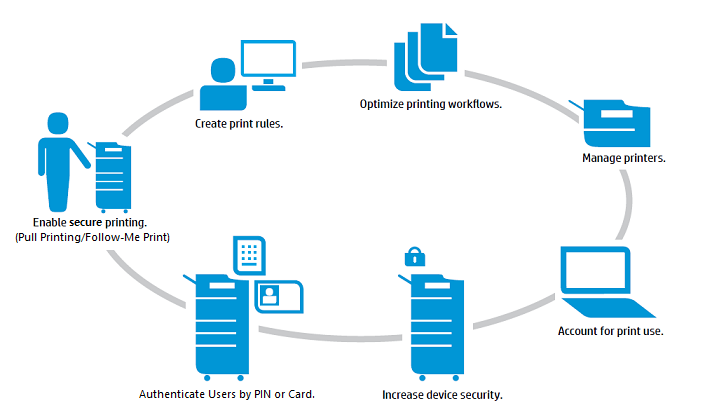
1. Secure Pull Printing / Follow-Me Print / Print Anywhere
Print Job Manager provides secure, instant access to documents needed at any location and eliminates wasted paper and consumables. It can secure company's confidential information, enable secure printing on all printers, improve company workflow, saves time and money throughout your organization.
- Security/Compliance: Sensitive documents are no longer left visible to anyone walking up to a printer.
- Day-to-Day Cost Savings: The amount of paper and toner are reduced as the amount of print jobs goes down.
- Green: No longer are print jobs abandoned or forgotten at printers, wasting resources.
- Print jobs are no longer limited to the local printer. A print job can be printed in one location and picked up at any other location, even across the country. No more carrying heavy bundles of presentations from office to office.
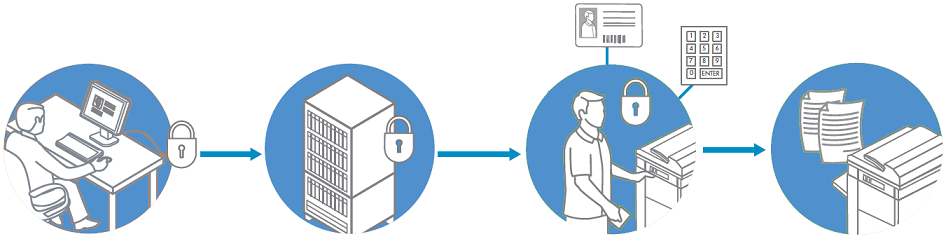
1.1 Users print documents from their computers.
1.2 Documents are stored on Print Job Manager server.
1.3 Users can authenticate through PIN or card at the printer.
1.4 Users can restrieve jobs when and where they need them.
2. User Authentication and Print Notification
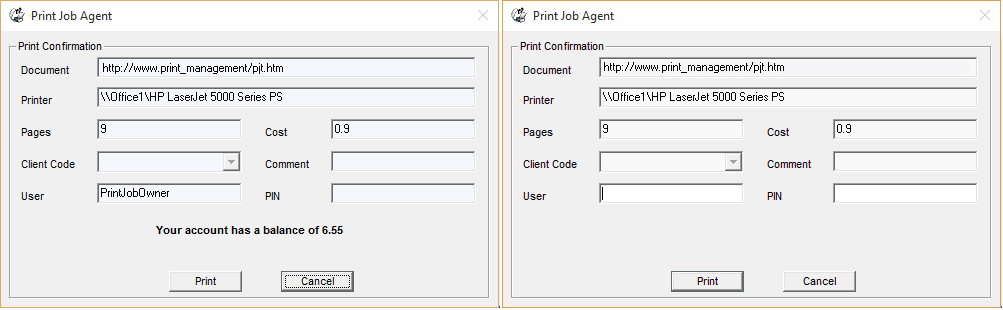
Print Job Manager provides the users with popup notification showing the document name, destination printer name, total pages, cost, and balance. It also allows users to enter user ID/PIN from their Windows, Mac OSX/Classic, or Linux workstations before the print jobs can be printed.
3. Assign Project Code/Client Code/Job Code to a Print Job
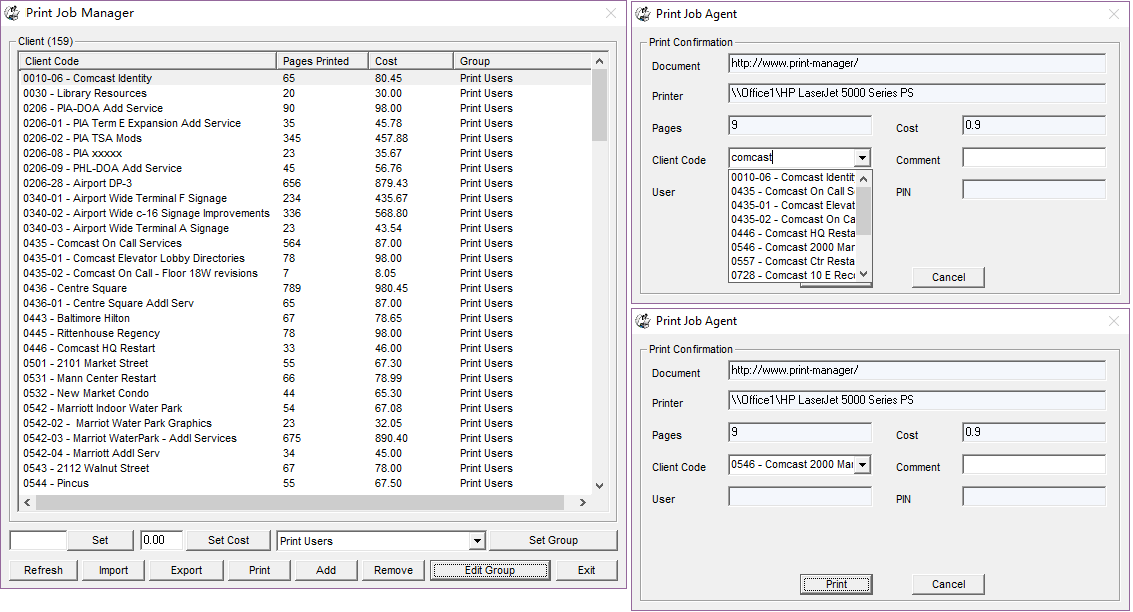
Print Job Manager allows users to bill the print jobs by entering client codes/project codes before the print jobs print from their Windows, Mac OSX/Classic, or Linux workstations. There is no limit for the number of client codes.
4. Print Control and Print Restriction by Rules
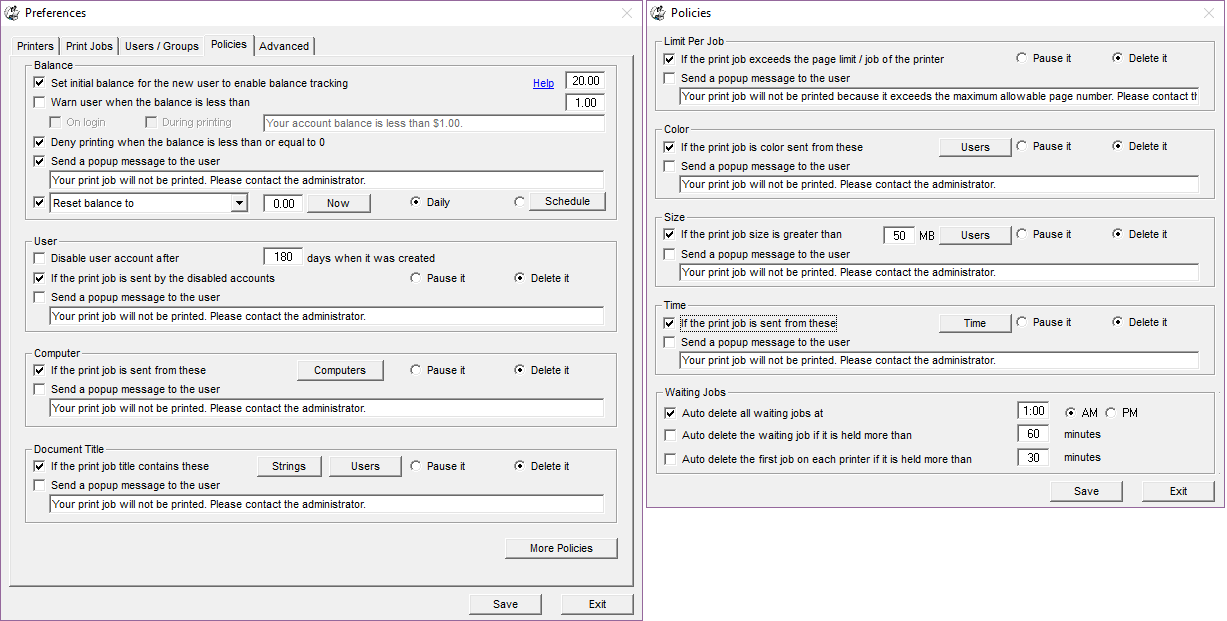
Print Job Manager allows you to create print rules to pauses or cancels printing automatically by account status, the maximum allowable pages per print job per printer, document restrictions, computer restrictions, color restriction, print job size restriction and day/time.
5. Allocate Print Quotas to User
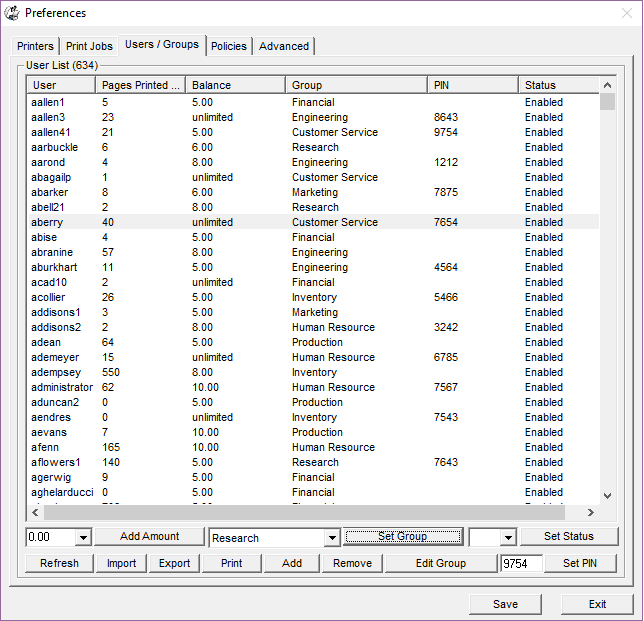
The print quota can be allocated to an individual user or allocated based on user's group. The new users can be assigned the pre-defined print quota automatically when they print the first time. The users/groups can be imported from a Windows Active Directory or a CSV file. The users can be required to set their password when they print the first time, or they can change the password from their computers any time.
Save
Print Job Manager has proved fruitful for many businesses and educational facilities to manage and understand their printing costs, and reduce wasted printing by 20% - 50%.

Why are there many corporations and educational institutions loving Print Job Manager? Print Job Manager solves real business needs.
 For
print auditing purpose, we implement Print Job Manager to track
around 400 printers in which 150 printers are set up locally
with USB, parallel or TCP/IP port. Other printers are set up on
print servers which are shared. Print Job Manager has allowed us
to effectively record all of our print jobs, make it easier to
deal with document output, reduce costs, and distribute expenses
consequently. We have been satisfied with PrinterAdmin software.
For
print auditing purpose, we implement Print Job Manager to track
around 400 printers in which 150 printers are set up locally
with USB, parallel or TCP/IP port. Other printers are set up on
print servers which are shared. Print Job Manager has allowed us
to effectively record all of our print jobs, make it easier to
deal with document output, reduce costs, and distribute expenses
consequently. We have been satisfied with PrinterAdmin software.
- Roger Getzmann, Coca-Cola Beverages AG, Switzerland
 Print
Job Manager has done a tremendous job on our college campus of
lowering printing costs. We evaluated several different print
manager software, and PrinterAdmin’s was certainly the best
solution for all our needs. Their technical support has
continued to assist us to customize their product, and the paper and
toner savings are more than spend on the application in less
than a year. In accordance with the good results of PrinterAdmin’s
program, we are planning on using this program on two print
servers, more than 1000 computers, and 10 independent labs at
CNM.
Print
Job Manager has done a tremendous job on our college campus of
lowering printing costs. We evaluated several different print
manager software, and PrinterAdmin’s was certainly the best
solution for all our needs. Their technical support has
continued to assist us to customize their product, and the paper and
toner savings are more than spend on the application in less
than a year. In accordance with the good results of PrinterAdmin’s
program, we are planning on using this program on two print
servers, more than 1000 computers, and 10 independent labs at
CNM.
- Francis J. Heise, MBA, Computer Labs
Manager, Central New Mexico Community College, USA
 We
have been progressing nicely with the Print Job Manager, and we
are very pleased with it. We now are able to help students with
research or school work instead of just dealing with the
printers. It has really made a tremendous impact on the library.
Students like it too. It prevents a few students from abusing
the library privileges. We are no longer kinkos clerks--we are
real librarians.
We
have been progressing nicely with the Print Job Manager, and we
are very pleased with it. We now are able to help students with
research or school work instead of just dealing with the
printers. It has really made a tremendous impact on the library.
Students like it too. It prevents a few students from abusing
the library privileges. We are no longer kinkos clerks--we are
real librarians.
- Jeff Davis, Librarian, NYC Education, USA
 In
a small architectural firm, the costs related to printing
(especially oversized documents) can easily take a sizable bite
out of project fees and such a loss can be very difficult to
absorb. We needed a way to track and account for our in-house
printing so that we could transfer the printing expenses
associated with project documentation to our clients. First and
foremost, we needed a package that would provide features like
tracking by project number and a way for our users to define how
to bill the print from their local machine. We looked at several
offerings, but found that Print Job Manager paired with Print
Job Agent fit the bill perfectly. Second, we needed a solution
that would be simple to install and operate since there is no
distinct I.T. department in our small office.
In
a small architectural firm, the costs related to printing
(especially oversized documents) can easily take a sizable bite
out of project fees and such a loss can be very difficult to
absorb. We needed a way to track and account for our in-house
printing so that we could transfer the printing expenses
associated with project documentation to our clients. First and
foremost, we needed a package that would provide features like
tracking by project number and a way for our users to define how
to bill the print from their local machine. We looked at several
offerings, but found that Print Job Manager paired with Print
Job Agent fit the bill perfectly. Second, we needed a solution
that would be simple to install and operate since there is no
distinct I.T. department in our small office.
- Paul Carter, Architect, SH Associates, USA
Download Your 30-Day Free Trial Today to Find Out How Print Job Manager Can Track, Control and Save Your Printing Costs
Any questions? Send an email to support@printlimit.com or call 1-801-425-5918